
Best UV DTF Printers for Cup Wraps and Stickers (2026)
The best UV DTF printers for cup wraps, decals and stickers on glass, metal and acrylic, plus UV flatbeds that print straight onto objects, compared for 2026.
Affiliate disclosure: product links on this page go to Amazon, or to the maker's own store for brands that sell only direct. As an Amazon Associate we earn from qualifying purchases, at no extra cost to you; a link to a maker's store earns us nothing. No retailer or brand sees our picks before they are published or has any say in them. How we choose.
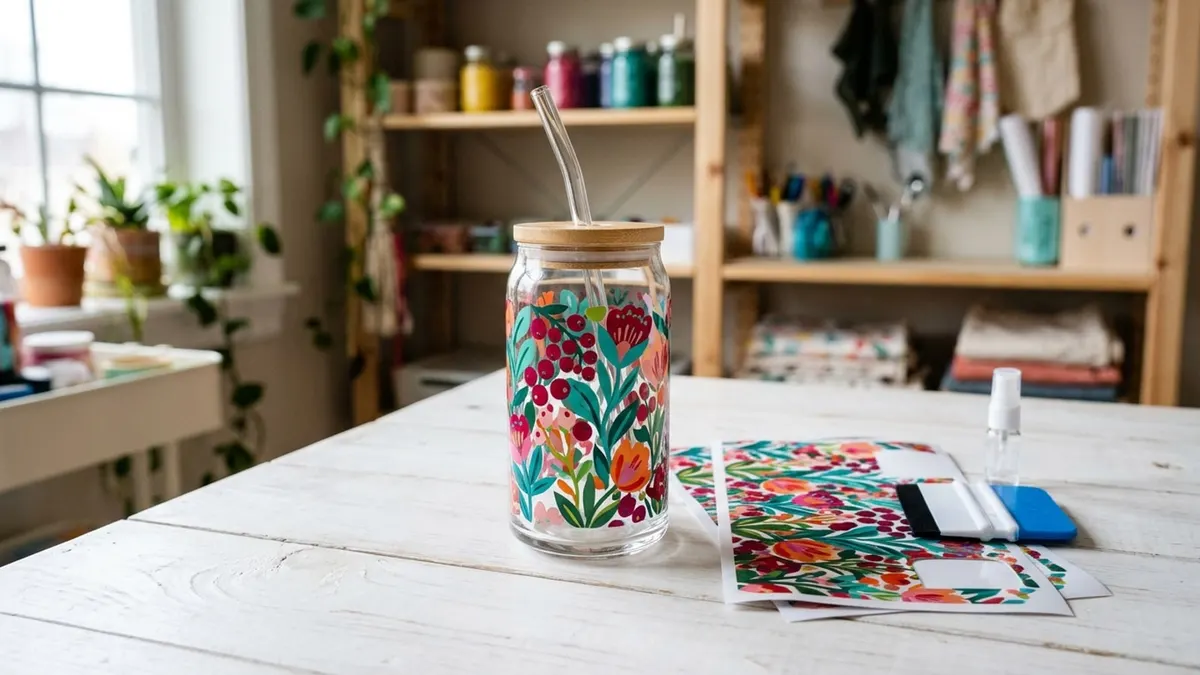
UV DTF prints a design in UV-cured ink onto a film, laminates it, and turns it into a rub-on sticker that bonds to hard surfaces: Roland lists glass, metal, acrylic, ceramic, wood and plastic. It is how sellers put full-color wraps on glass cans and tumblers in any color without heat. For a dedicated A3 sticker machine, the Procolored VF13 Pro prints and laminates in one unit and is sold by Procolored's own store.
If you would rather print straight onto objects (phone cases, acrylic blanks, slates), a UV flatbed like the OMTech Spectra Pro prints color, white and gloss varnish directly, and can also print UV DTF film. Both are business purchases; for shirts, see our DTF printer guide instead.
Few UV DTF makers publish spec sheets we could read, so most product figures below come from the Amazon listings and are labelled. The method itself is described from Roland's and Mimaki's own material.
Our top picks at a glance
1. Best dedicated UV DTF printer
Procolored VF13 Pro UV DTF PrinterType: UV DTF (sticker transfers) · Print width: 13 in, A3+ · Laminating: Built in · Warranty: 1 year (per the listing)
2. Best UV flatbed (prints on objects)
OMTech Spectra Pro A3+ UV Flatbed PrinterType: UV flatbed, direct to object · Print width: 13.8 x 17.7 in bed · Laminating: Not applicable · Warranty: 2 years (per the listing)
3. Best value A3 UV DTF
INKSONIC VF13 UV DTF PrinterType: UV DTF (sticker transfers) · Print width: A3+ · Laminating: Automatic · Warranty: 6 months (per the listing)
4. Best entry-level
EXPLUX A4 UV PrinterType: UV flatbed with bottle holder · Print width: A4 class · Laminating: Not built in · Warranty: 1 year (per the listing)
5. Best small direct-to-object printer
Procolored V6 UV Printer (A4)Type: UV flatbed, direct to object · Print width: 6.7 in (210 mm) · Laminating: Not applicable · Warranty: See seller
| Pick | Type | Print width | Laminating | Warranty | Buy |
|---|---|---|---|---|---|
| Procolored VF13 Pro UV DTF PrinterBest dedicated UV DTF printer | UV DTF (sticker transfers) | 13 in, A3+ | Built in | 1 year (per the listing) | Amazon |
| OMTech Spectra Pro A3+ UV Flatbed PrinterBest UV flatbed (prints on objects) | UV flatbed, direct to object | 13.8 x 17.7 in bed | Not applicable | 2 years (per the listing) | Amazon |
| INKSONIC VF13 UV DTF PrinterBest value A3 UV DTF | UV DTF (sticker transfers) | A3+ | Automatic | 6 months (per the listing) | Amazon |
| EXPLUX A4 UV PrinterBest entry-level | UV flatbed with bottle holder | A4 class | Not built in | 1 year (per the listing) | Amazon |
| Procolored V6 UV Printer (A4)Best small direct-to-object printer | UV flatbed, direct to object | 6.7 in (210 mm) | Not applicable | See seller | Amazon |
Best dedicated UV DTF printer
Procolored VF13 Pro UV DTF Printer
An A3+ machine that prints on A film and laminates the B film in one pass, from the best-known desktop DTF brand.
- Type
- UV DTF (sticker transfers)
- Print width
- 13 in, A3+
- Laminating
- Built in
- Warranty
- 1 year (per the listing)
Pros
- Prints and laminates in one machine, with a cutter for the finished sheet, per the listing
- Dual XP600 printheads
- Automatic printhead cleaning every 10 hours when left on, using about 1 mL of ink a day, per the listing
Cons
- The highest price of the sticker printers here
- Software runs on Windows, per the listing
- Stock was limited when we checked
The VF13 Pro is built for the UV DTF workflow: print the design on A film, laminate it to B film in the same machine, then cut and apply. The listing describes that sequence, dual XP600 printheads, a cutter, side doors for maintenance, an optional stand with an electric rewinder, and Procolored's Pro RIP software for Windows. It also notes that when the printer is left on it cleans the printhead every 10 hours, using about 1 mL of ink a day.
That daily ink use is the honest cost of any UV DTF printer: it wants to stay on and in use. Buy it when cup wraps and decals are an established product line rather than an experiment.
Best UV flatbed (prints on objects)
OMTech Spectra Pro A3+ UV Flatbed Printer
A desktop UV flatbed that prints color, white and gloss varnish straight onto blanks up to 5.5 inches tall, with a 2-year warranty.
- Type
- UV flatbed, direct to object
- Print width
- 13.8 x 17.7 in bed
- Laminating
- Not applicable
- Warranty
- 2 years (per the listing)
Pros
- CMYK plus white plus gloss varnish, with dual F1080 printheads, per the listing
- Prints directly on wood, acrylic, metal, glass and leather up to 5.5 inches tall
- Sold by OMTech's own store, with a 2-year warranty in the listing
Cons
- Heavy: about 153 lb, per the listing
- A flatbed prints flat or near-flat items; tumblers need a rotary attachment or UV DTF film
- Business pricing
A UV flatbed skips the film for flat items: it prints and cures ink directly on the object. OMTech's listing gives a 13.8 by 17.7 inch print area, 5.5 inches of print height, CMYK plus white plus gloss varnish, dual F1080 printheads, white ink circulation and automatic cleaning, and says its inks are GREENGUARD Gold certified low-VOC inks. It suits phone cases, acrylic signs, slates, tags and promotional items.
Choose a flatbed over a sticker printer if most of your products are flat blanks you can lay on the bed. Choose a UV DTF printer if most are curved, like tumblers and glass cans, where a transfer is easier to apply.
Best value A3 UV DTF
INKSONIC VF13 UV DTF Printer
An all-in-one A3+ UV DTF printer with automatic laminating and a California repair point, at a lower price than the Procolored.
- Type
- UV DTF (sticker transfers)
- Print width
- A3+
- Laminating
- Automatic
- Warranty
- 6 months (per the listing)
Pros
- Dual XP600 printheads with a dense white underbase for dark and clear surfaces, per the listing
- Automatic laminating, a vacuum suction platform and a cutting platform
- Listing describes phone support and a California-based repair service point
Cons
- A 6-month warranty in the listing, half the Procolored's
- Smaller brand; check support terms before you buy
- Every figure here comes from the listing
INKSONIC's VF13 covers the same job as the Procolored at a lower price. The listing describes an all-in-one A3+ UV DTF printer with dual XP600 printheads, automatic laminating, a vacuum suction platform to stop film shifting, an auto-cleaning system, a low-ink alert and a built-in waste ink bottle, plus 24/7 assistance and a California-based repair service point.
The trade is the warranty: the listing's warranty field says 6 months. If you have a local or US repair route, that matters less; if not, the Procolored's year of cover may be worth the difference.
Best entry-level
EXPLUX A4 UV Printer
An A4 UV printer with a bottle holder and a vacuum bed for trying UV printing on small items before a larger machine.
- Type
- UV flatbed with bottle holder
- Print width
- A4 class
- Laminating
- Not built in
- Warranty
- 1 year (per the listing)
Pros
- Bottle holder for cylindrical items and a vacuum bed for flat ones, per the listing
- White ink circulation and mixing, infrared auto-height and a self-cleaning printhead
- The lowest price among the UV machines here
Cons
- Software is Windows compatible, per the listing; no Mac support stated
- Smaller output than the A3 machines
- The listing's print area figure (19.7 x 12.6 in) is larger than A4; check before buying
EXPLUX's A4 printer is a lower-cost way into UV printing. The listing describes an XP600 printhead, white ink circulation and mixing, infrared height adjustment, a self-cleaning head, a vacuum platform, a bottle holder for cylindrical items, and the ability to print gloss and textured effects on acrylic, glass, metal, plastic, wood, stone and leather.
One caution: the listing's stated printing area (19.7 by 12.6 inches) is larger than an A4 sheet, which is an inconsistency to confirm with the seller. For a first UV printer to test products and pricing, it is a reasonable start.
Best small direct-to-object printer
Procolored V6 UV Printer (A4)
A compact 6.7 inch wide UV printer from Procolored for printing directly on small items like phone cases, golf balls and bottles.
- Type
- UV flatbed, direct to object
- Print width
- 6.7 in (210 mm)
- Laminating
- Not applicable
- Warranty
- See seller
Pros
- Prints directly on object surfaces with CMYK plus two white channels, per the listing
- Built-in UV lamp for quick curing and an infrared height sensor
- Auto-cleans every 10 hours when left on
Cons
- Small print width
- Windows-only software, per the listing
- No warranty term in the listing
The V6 is Procolored's small direct-to-object UV printer. The listing gives a printable width of 210 mm, six inks (CMYK plus two whites) with a circulation system, a built-in UV lamp, an infrared height sensor, automatic cleaning every 10 hours, and RIP software for Windows. It suits small personalized items printed one or a few at a time.
How UV DTF works
Mimaki describes UV-DTF as a decoration method in which a design printed on a special film is transferred to the target material, and says it makes it easy to decorate uneven or curved surfaces that conventional UV printing struggles with. The film comes in two parts. Roland's process is typical: print the design (with white and gloss layers) on the A sheet, laminate the B transfer film over it with a heat-assisted laminator or a heat press for 10 seconds at 225°F, then peel away the backing, place the transfer on the item, and smooth it with a squeegee.
Roland says UV DTF transfers adhere to glass, metal, acrylic, ceramic, wood and plastic, the surfaces traditional heat transfers do not work on. Its guide also stresses a clean, dust-free surface, since fingerprints can affect adhesion.
Applying UV DTF transfers well
Roland's tips cover the steps that most affect adhesion. Wipe the item with 91% isopropyl or denatured alcohol and let it fully evaporate. Use a heated laminator for even pressure across the sheet. For tumblers and bottles, hold the item in a fixture or jig so both hands are free to apply the transfer. And let printed sheets sit 1 to 2 hours, or even overnight, so the inks are fully cured before you apply them.
UV DTF vs UV flatbed vs regular DTF
| UV DTF printer | UV flatbed printer | Regular DTF printer | |
|---|---|---|---|
| Output | Rub-on transfers (stickers) | Print directly on the object | Heat-press transfers |
| Best for | Curved items: tumblers, glass cans, bottles | Flat or near-flat blanks | Shirts, hoodies, bags |
| Heat press needed | No (laminator built in or separate) | No | Yes |
| Ink | UV-curable | UV-curable | Water-based, plus powder |
What to look for
Laminating built in
A UV DTF transfer needs its B film laminated on. All-in-one printers like the Procolored VF13 Pro and INKSONIC VF13 do it in the machine; otherwise you need a separate heated laminator, or Roland's heat press method.
White and varnish channels
White ink lets the design show on clear glass and dark surfaces, and a clear varnish or gloss layer adds shine and protection. Mimaki's UV-DTF printer pairs flexible color inks with hard white and clear inks for strength and flexibility, which is the general approach across the category.
Daily use and maintenance
UV printers want to run regularly. Procolored's listings describe automatic cleaning every 10 hours when the printer is left on, using about 1 mL of ink a day. Factor that into your costs, and keep the machine in a stable room.
Software and support
Most of these printers ship with RIP software for Windows. Check the platform, the warranty term (from 6 months to 2 years in the listings here) and where repairs happen before you buy.
Safety
UV printers cure ink with ultraviolet light and use reactive inks. Follow the printer maker's manual and the safety data sheet for your ink on ventilation, gloves and eye protection, and keep the machine's covers closed while it prints.
If your goal is drinkware in light colors, sublimation on coated blanks is a lower-cost alternative; see our DTF vs sublimation comparison and tumbler press guide.
Frequently asked questions
What is the difference between DTF and UV DTF?
Regular DTF prints water-based ink and powder onto film that is heat-pressed onto fabric. UV DTF prints UV-cured ink onto a two-part film to make a rub-on transfer for hard surfaces like glass, metal and acrylic, with no heat press needed to apply it.
Do UV DTF transfers work on tumblers?
Yes, that is one of their main uses. Roland says UV DTF adheres to glass, metal, acrylic, ceramic, wood and plastic. Clean the surface first, place the transfer, and smooth it with a squeegee to remove air bubbles.
Do I need a laminator for UV DTF?
The B film has to be laminated over the printed A film. All-in-one UV DTF printers laminate in the machine. Without one, Roland suggests a heat-assisted laminator or a heat press for 10 seconds at 225°F.
Should I buy a UV DTF printer or a UV flatbed?
Buy a UV DTF printer if most of your products are curved, like tumblers and glass cans. Buy a UV flatbed if most are flat blanks you can lay on the bed, such as phone cases and acrylic signs. Some flatbeds can also print UV DTF film.
Is a UV DTF printer worth it for a small business?
Only with steady demand. These printers cost thousands of dollars and use ink every day for automatic cleaning when left on. Many sellers start by buying ready-made UV DTF transfers to test demand first.
Sources
- How to Print UV DTF and UV HTV, Roland DGA
- Mimaki announces the UV-DTF Printer UJV300DTF-75 Release, Mimaki
- UV-DTF: Top Tips for Outstanding Results, Roland DGA
Cover image: Illustration: CraftsCall (AI-generated)
Related guides
Best DTF Printers for a Small Shirt Business (2026)
Four DTF setups from a 13 inch desktop kit to an automated print-to-bake line, compared on print width, printheads, curing and warranty.
Best Sublimation Printers for Shirts, Mugs and Tumblers (2026)
Five purpose-built sublimation printers compared on print size, ink system, software and warranty, and why a converted EcoTank is a risk.
DTF vs Sublimation: Which Printing Method Fits What You Sell
The two most popular print-and-press methods compared on fabrics, colors, hard goods, equipment and running work, with the makers' own rules.